CattleGoSmarter Cow-Calf Management
QR code for the CattleGo app Scan with your phone's camera
Start free
Features

Everything a cow-calf herd needs to keep track of, organized around the work.

Record it where it happens, on the phone at the chute or in the barn, and plan the season on the computer. The same herd, the same records, signal or not.

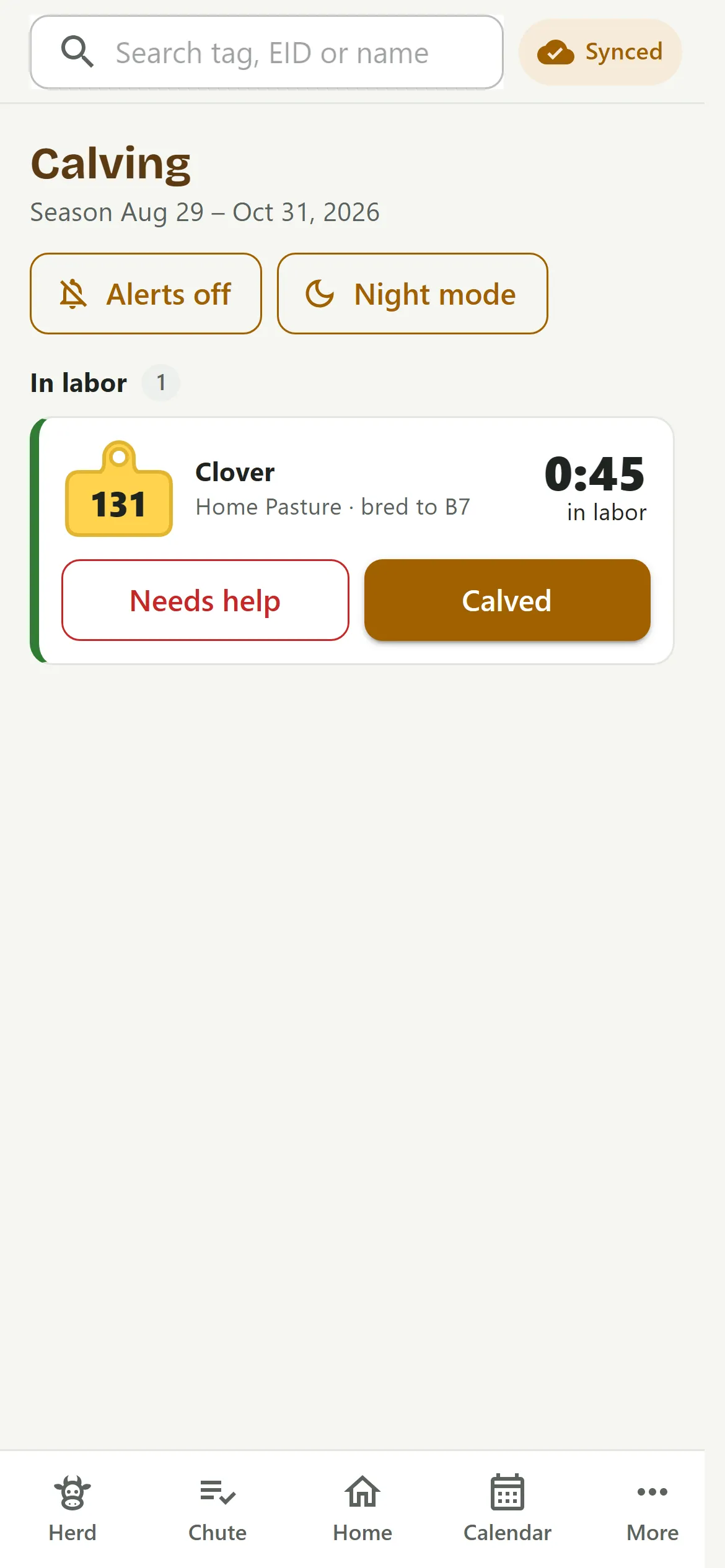
The calving board on a phone: cow 131 in labor for 45 minutes, with Needs help and Calved buttons.
Calving

A calving board built for night checks.

See who's in labor, who's late and who's due this week, and record each calf in a few taps.

  • Labor timers that turn amber at an hour and red at 90 minutes, with an alert on the phone while the board is open.
  • Tap Calved: the calf's tag is suggested from the cow's, with birth weight, calving ease and calf vigor.
  • Twins, stillborn calves and grafting a calf onto another cow are recorded as they happen.
  • Every calf is linked to its dam and sire, so the cow's calving history builds itself.
  • Night mode for the barn at 2 a.m.: a dark, high-contrast board with big buttons.
  • Calving spread: the share of the season's calves born in the first 21, 42 and 63 days, to see how tight your calving is.
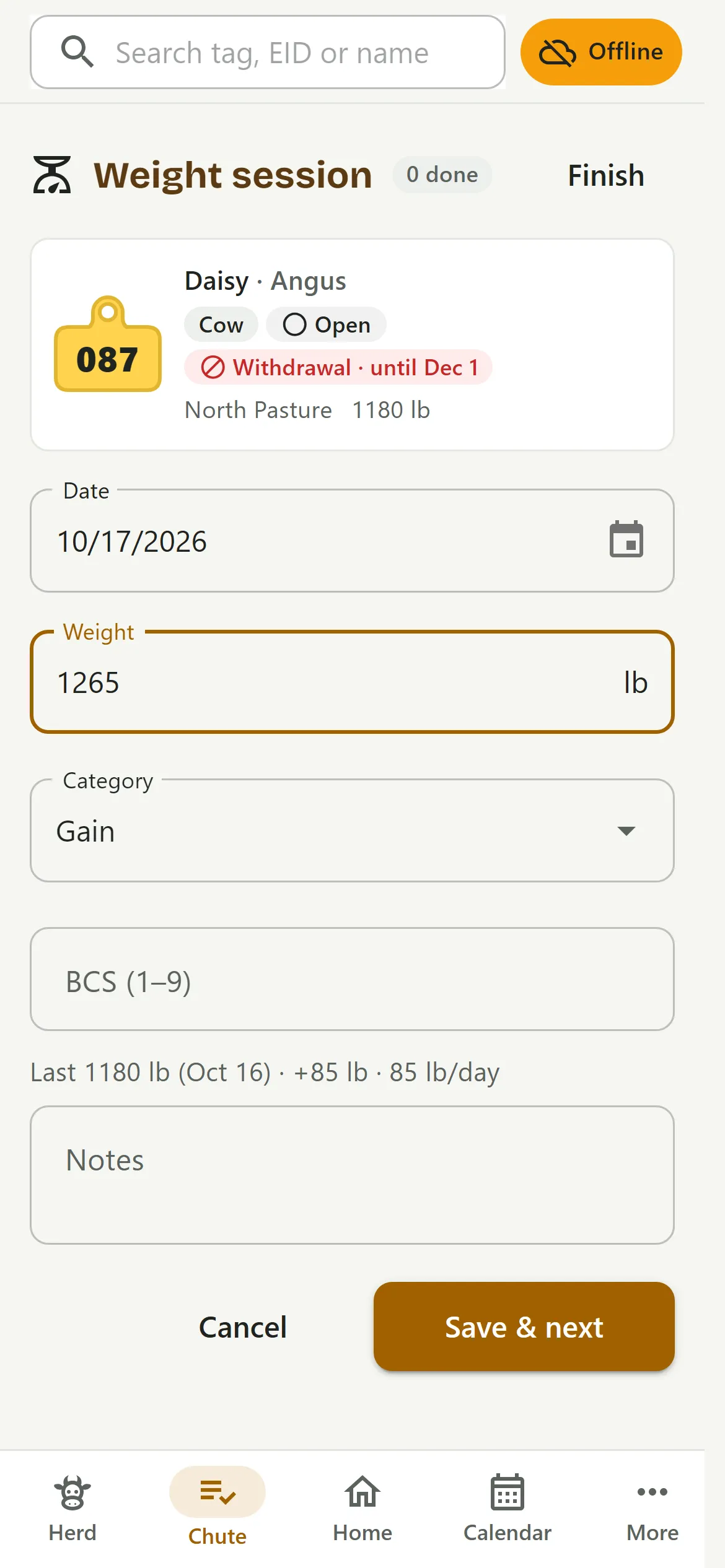
A weighing session on a phone: animal 087 found by tag, the weight entered, and Save and next.
Chute work

Work the pen in one session, animal after animal.

Start a session for treating, weighing, breeding or preg checking, then move from one animal to the next without leaving the screen.

  • Find each animal by scanning its EID with a connected reader, or by typing its tag.
  • A connected scale fills in the weight; the last weight and gain are shown next to it, and withdrawal is flagged before you treat.
  • Weaning and yearling weights show the adjusted weight and the calf's ratio in its group before you save, with light calves flagged.
  • A running list of who's done; leave and come back to the same session later.
  • When the pen is done, a summary: head count, average weight and gain, how many are pregnant. Put those animals in a group or save the list as a spreadsheet.
  • A scale's saved records can also be brought in from a CSV file.
  • Update a whole group at once: treat, move, weigh or change status for the animals you tick.
New · Readers and scales

Connect your EID reader and scale by Bluetooth or Wi‑Fi.

In the CattleGo app for iPhone and Android, the tag and the weight come straight from your equipment, so nobody types numbers at the chute.

  • EID readers over Bluetooth: Gallagher HR, Tru‑Test SRS2i and XRS2i, and Allflex readers. On Android, readers that use classic Bluetooth too.
  • Scales over Bluetooth: Tru‑Test S3 and Gallagher W series. Gallagher TW scales over Wi‑Fi, and over Bluetooth on Android.
  • Scan a tag and the animal comes up, with a beep. The live weight is shown large and taken once it holds steady.
  • Pair once; the app reconnects on its own and keeps the screen on while a device is connected.
  • Readers set to keyboard mode need no pairing, on the phone or on a computer.
  • Works with no signal: the devices talk to the phone, not the internet.

Have a different reader or scale? Tell us the model and we'll check it.

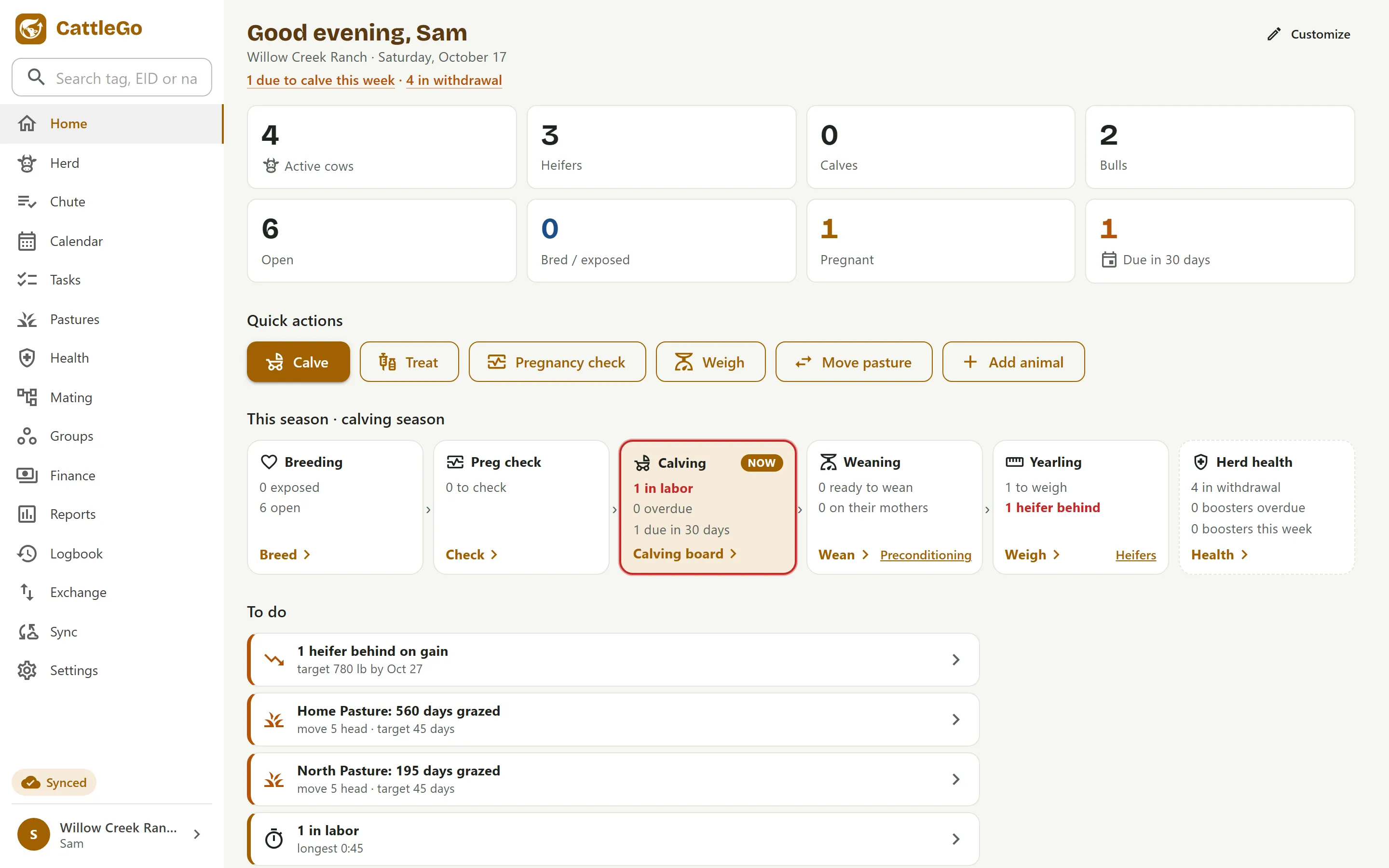
The CattleGo home page on a computer: head counts, open and pregnant cows, quick actions and this season's breeding, preg check, calving and weaning.
Breeding and preg checks

Know who's bred, who's open and when they're due.

Set when the bulls go in, and CattleGo lays out the season: preg checks, calving, weaning and yearling weights.

  • Record natural service exposure or AI, with the sire and the date.
  • Preg check results and days bred give each cow a due date.
  • Breeding soundness exams for bulls.
  • Replacement heifers tracked against a target weight for breeding, so you see who's behind.
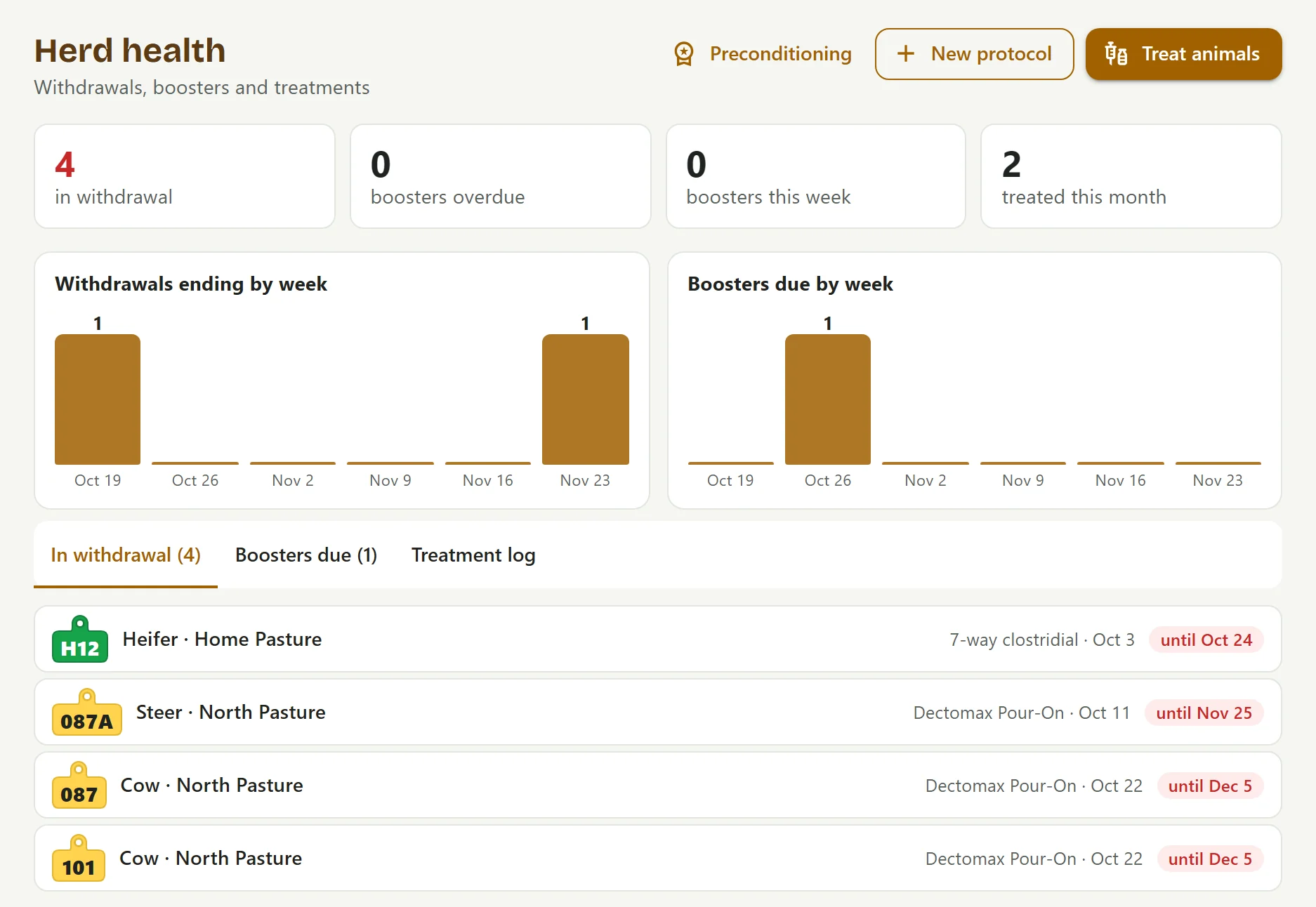
The herd health page: animals in withdrawal and the date each can ship, withdrawals ending and boosters due by week.
Health

Withdrawal dates you don't have to work out.

Record a treatment once, and CattleGo knows when the animal can ship and when its booster is due.

  • Save the protocols you use often, with dose, route, withdrawal and booster days, and give them with one tap.
  • See who's in withdrawal and the date each animal can ship.
  • Shipping check: pick the day the trailer comes and see who's clear, who's still in withdrawal, and who was treated with no withdrawal recorded, so no animal is assumed safe.
  • Boosters due show on the health page and the calendar. Give them right there, with the lot number and who gave them.
  • A treatment log you can filter and print.
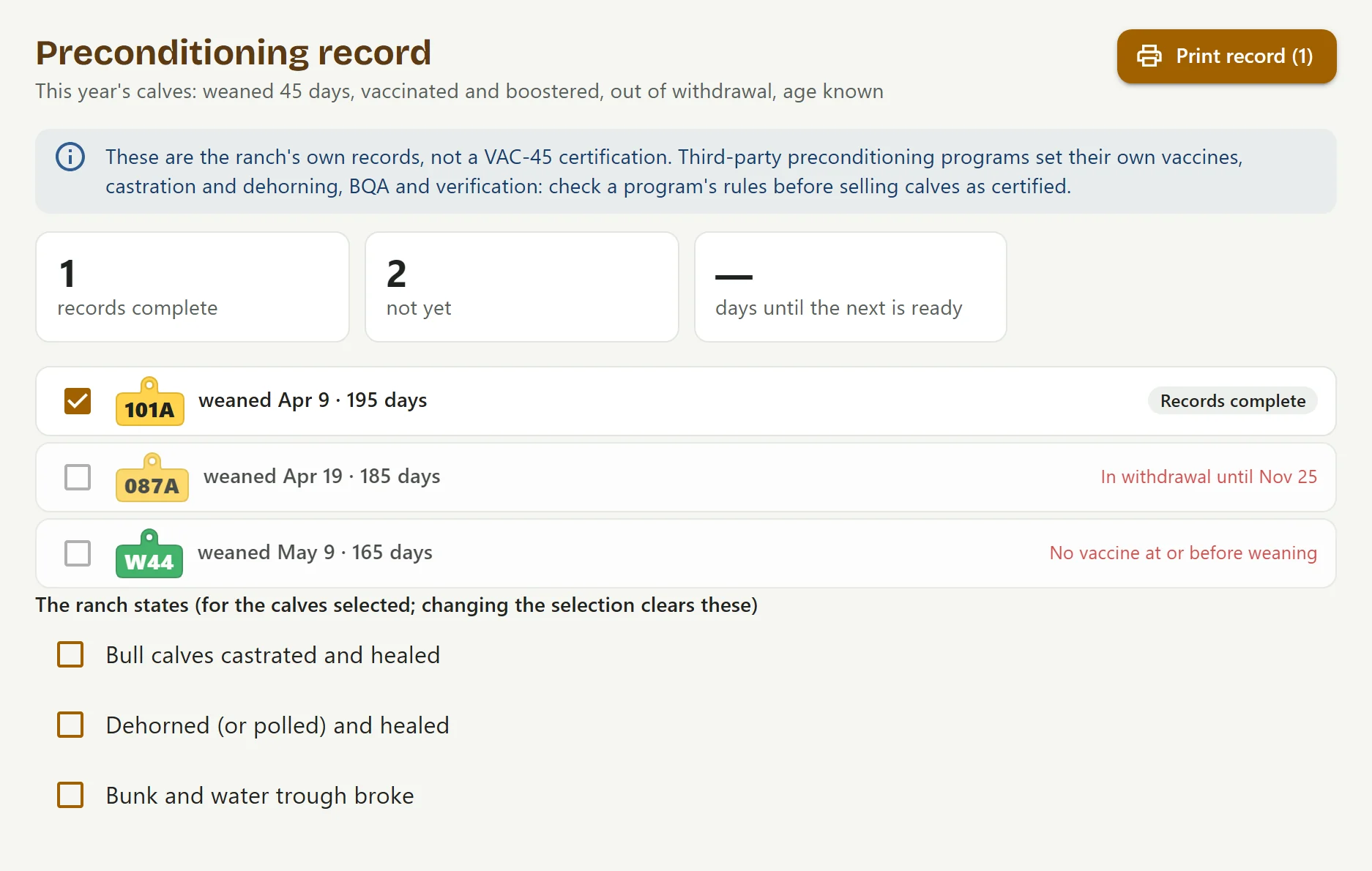
The preconditioning record: this year's calves with weaning date and days weaned, which are complete, and the ranch's statements on castration, dehorning and bunk breaking.
Weaning and sale

Have the numbers ready when the calves go.

From the birth weight on, each calf's record is ready for weaning, yearling weights and the buyer.

  • Weaning weights with adjusted 205-day weights and ratios within each group; adjusted yearling weights too.
  • Preconditioning records you can print for buyers, with each calf's vaccinations and treatments.
  • Sales, deaths and their reasons kept on each animal's record.
  • A file of the calves for a feedlot that uses FLS Cloud.
  • A season scorecard: pregnancy, calving and weaning rates, and pounds weaned per cow exposed, the number that pays.
  • A list of cull candidates to review before you sell.
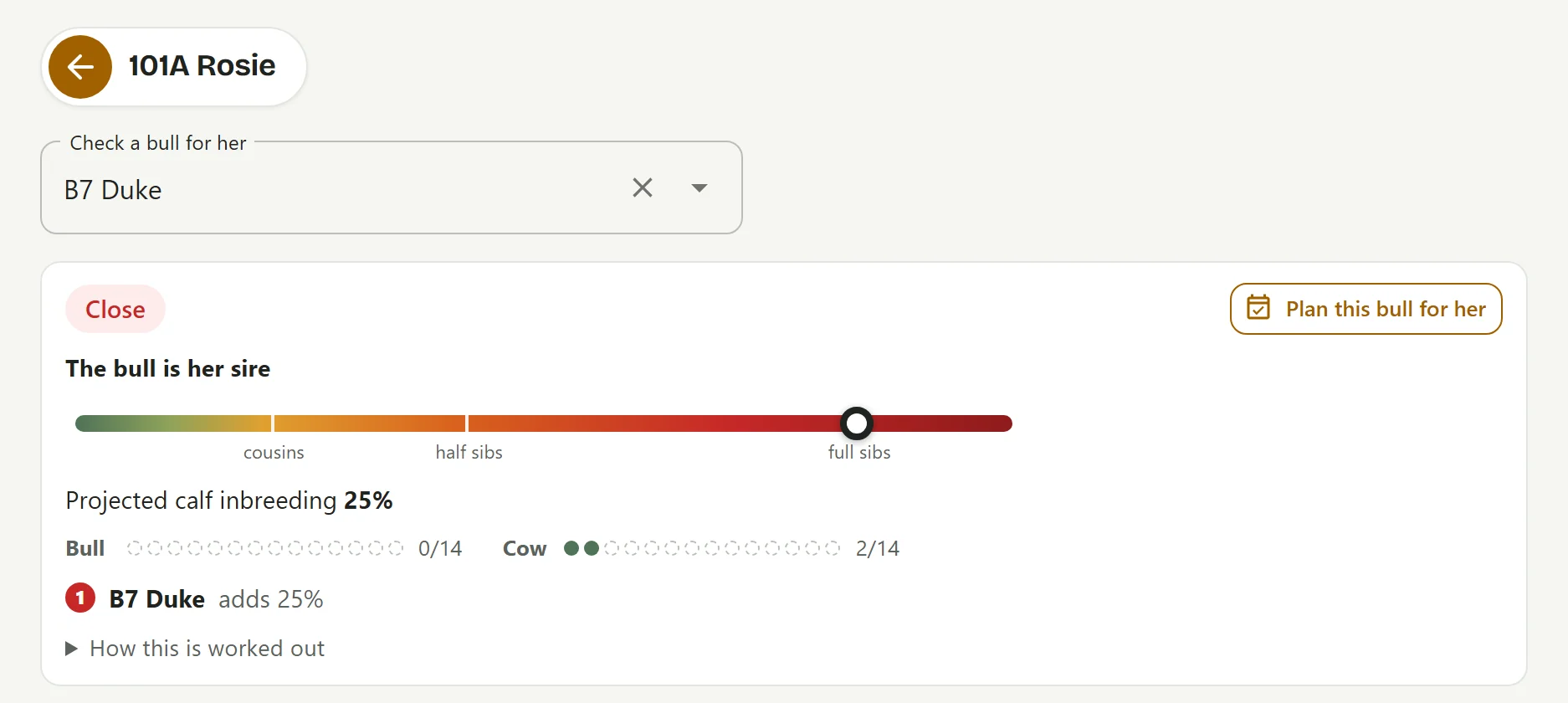
A mating check: the bull is the heifer's sire, marked Close, with 25 percent projected inbreeding and the shared ancestor listed.
Pedigrees and mating

Check a bull against your cows before breeding season.

For purebred and seedstock herds: three-generation pedigrees, the ancestors a pair has in common, and the projected inbreeding of their calf.

  • Pedigrees drawn three generations deep; fill in a missing ancestor right on the chart.
  • Compare up to four bulls against every female in a group, shown green, orange or red, with grey when the pedigree is too thin to judge.
  • Set the inbreeding level that should catch your eye; it's your ranch's choice.
  • Plan which bull goes with which cow, and print or export the plan.

Worked out from the pedigrees you've recorded: missing ancestors can hide a relationship, and you make the call.

Pastures

See what's on every pasture, and how hard it's been grazed.

Which animals are where, how long they've been there, and which pastures are rested and ready for the next move.

  • A 12-month grazing calendar for each pasture: the darker the month, the more animal-days it carried.
  • What's on a pasture at a glance: cows, calves, heifers and bulls in one bar, with the counts.
  • Days grazed for the animals there now, and pastures rested and ready for the next move.
  • Move the whole herd on a pasture, or a few head, to the next one in one step.
Your crew

One herd for the whole crew, and a logbook of who entered what.

Add the people who work with you as workers or managers. Each signs in on their own phone, and everyone sees the same herd, signal or not.

  • The logbook lists what was entered or changed across the whole herd, by whom and when, without opening each animal.
  • Filter by person, by kind of record or by ear tag, and check the day's paper notes against what was entered.
  • A record entered days later shows both when it was typed and the date it's for.
  • Someone leaves? Disable them: their records stay, and their place is free for someone new.
Also included

The rest of the ranch's records.

Home, at a glance

One line on what needs a look today: calving this week, overdue, in withdrawal, waiting to upload. Below it, the cards you choose, in your order.

Paste from a spreadsheet

A sale barn sheet with weights and prices (per cwt too), a vet's Bangs vaccination list or DNA results: matched by tag or EID and previewed before anything is saved.

The herd list your way

Pick the columns, drag them into order and sort by any of them. Active, Sold, Dead and your own groups are one tap away.

Calendar and tasks

What's coming up in the season and the jobs to do, with due dates. Add the calendar to your phone's own calendar.

Costs and income

Expenses and income for the ranch and for each animal.

Groups

Your own groups, and smart groups that fill themselves, like all open cows.

Records for every animal

Tags and retags, EID, brand, photos, DNA and parentage, Bangs vaccination, notes, and the full story of what happened.

Selling breeding stock

Keep an asking price and marketing comments on the animals you have for sale.

Pounds or kilograms

Weights shown in lb or kg, whichever your operation uses.

Works with FLS Cloud

Open CattleGo straight from FLS Cloud without signing in again, and send your calves to a feedlot that uses it as a file.

Works with no signal

Each phone, tablet and computer keeps working offline and sends its records when it's back in range.

See it with a sample herd.

Sign up in a minute and try every part of it with sample cattle, then add your own.